by
by Comment installer Ndless 3.1 ("Ndl3ss") sur TI-Nspire ?
C'est facile ! Suivez ce tutoriel :
"Etape 0" : Vérifiez bien que votre calculatrice n'est pas en OS 3.2.4 ou ultérieur, sinon vous ne pouvez rien faire, désolé (plus de détails ici)
Et pour désinstaller Ndless ?
C'est facile ! Suivez ce tutoriel :
"Etape 0" : Vérifiez bien que votre calculatrice n'est pas en OS 3.2.4 ou ultérieur, sinon vous ne pouvez rien faire, désolé
(plus de détails ici)- Téléchargez Ndless 3.1
Téléchargez Ndl3ss ici et extrayez le .zip où vous le désirez.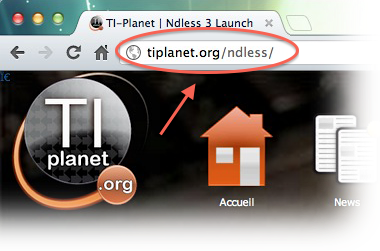
- Lancez le logiciel TI-Nspire sur ordinateur
Si vous ne l'avez pas déjà, vous pouvez le télécharger en version de démo ici : Windows Mac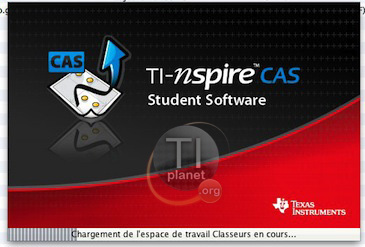
- Allez dans l'explorateur de documents
Cliquez sur l'onglet le plus à droite, comme montré sur la copie d'écran.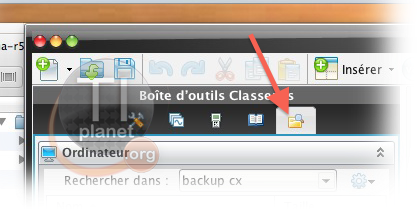
- Mettez-à-jour (ou downgradez) en OS 3.1
Si votre logiciel vous demande (ou vous a déjà demandé) de mettre à jour en version 3.1 (3.1.0.392, surtout pas 3.2.x ou plus !), alors faites le. Si vous ne l'avez pas fait, vous devez le faire manuellement (voir copie d'écran):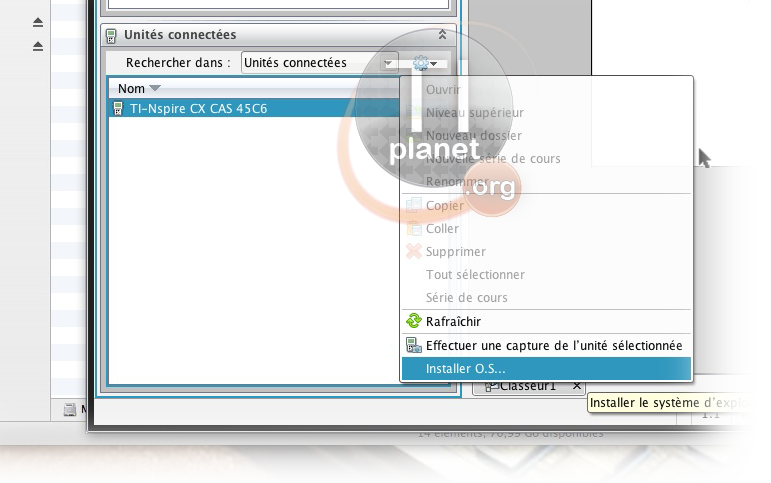
- Création du dossier "ndless" sur votre calculatrice, et transfert des ressources.
À la racine de votre périphérique Nspire, créez un nouveau dossier appelé "ndless". Ensuite, transférez dans ce nouveau dossier le fichier fraîchement téléchargé ndless_resources.tns, qui se trouve dans le dossier "calcbin" sur votre ordinateur, comme le montre la copie d'écran.
Transférez ensuite de la même manière ndless.cfg.tns.
Si le drag-and-drop (glisser-déposer) ne marche pas, faites-le à partir de l'explorateur du logiciel (le cadre juste au dessus)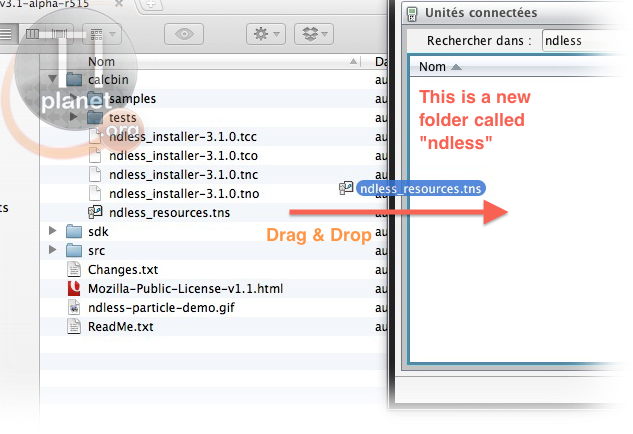
Cas particulier d'une réinstallation
Si vous aviez déjà Ndless et que vous voulez le mettre à jour, commencez d'abord par désinstaller Ndless (cf. tout en bas de cette page), puis supprimez ndless.cfg et ndless_resources de votre calculatrice.
- Transfert de l'installeur Ndless...
Maintenant, faites de même avec le fichier ndless_installer-3.1.0.xxx L'extension de ce fichier peut être : ".tcc" (Nspire CX CAS), ".tco" (Nspire CX), ".tnc" (Nspire CAS), or ".tno" (Nspire). Veuillez bien faire attention en prenant celui pour votre calculatrice ! Pour cet exemple, j'ai transféré celui pour Nspire CX CAS.
Si le drag-and-drop (glisser-déposer) ne marche pas, faites-le à partir de l'explorateur du logiciel (le cadre juste au dessus)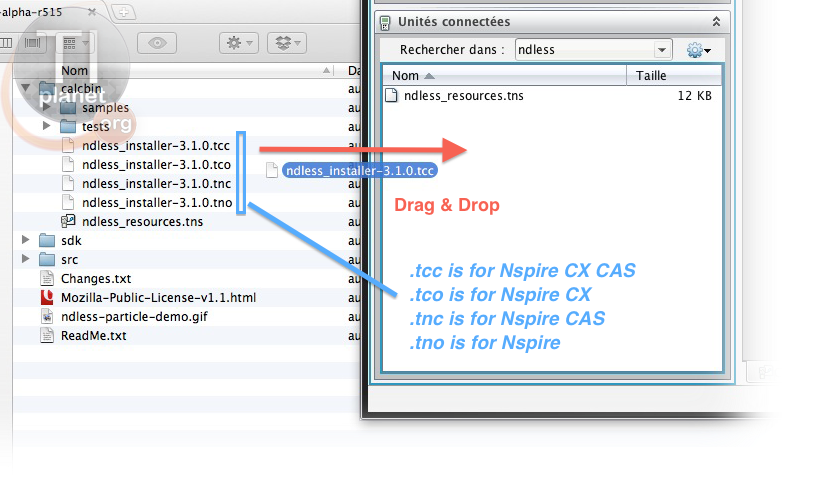
- On ignore l'avertissement...
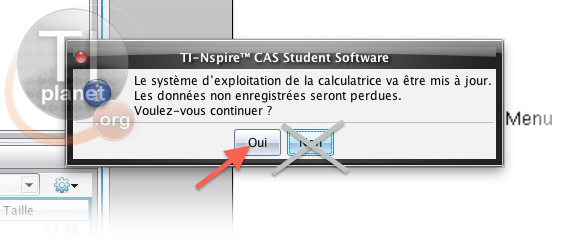
Le logiciel vous avertira que vous pouvez perdre des documents non sauvés, etc. Ignorez cet avertissement (mais sauvez quand même au préalable) en appuyant sur "OUI".
En fait, le logiciel croit que c'est un OS que vous voulez transférer, mais c'est un faux OS, qui contient l'exploit de Ndless
- Félicitations !
Sur votre calculatrice, vous devriez voir au bout de quelques secondes une fenêtre popup vous informant que Ndless a bien été installé: "Ndless successfully installed/updated".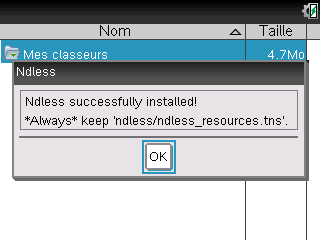
Appuyez sur OK, puis débranchez votre Nspire de l'USB.
L'ordinateur affichera alors une erreur (très souvent la barre se bloque au milieu), mais ne vous inquiétez pas, c'est normal. Fermez simplement la fenêtre d'erreur. Regardez plutôt ce qui se passe sur votre nspire. Si vous voyez "Ndless successfully installed/uptaded", c'est bon .
.
Si jamais le message vous dit que la Nspire va redémarrer ("The device will reboot now") après avoir affiché le message "Ndless successfully installed/updated", c'est normal également (mais pas obligatoire), et ne veut pas dire que Ndless n'a pas été installé.
Par contre, si elle redémarre sans vous afficher de popup, vous avez sûrement oublié une étape.
Maintenant que Ndless est installé, faites bien attention à ne jamais supprimer le fichier ndless_resources de votre calculatrice, car ceci pourrait provoquer un redémarrage en boucle qui ne peut être arrêté qu'avec un reformatage complet et réinstallation de l'OS.

Voilà, c'est fini ! Profitez-bien de votre TI-Nspire !
Vous pouvez désormais transférer des jeux (Gameboy, NES etc.), utilitaires (C/ASM...) etc..
Avec Ndless, libérez la puissance de votre machine !
- Quelques fonctionnalités avancées
-Si vous placez des programmes Ndless dans le dossier "ndless/startup" , ils seront lancés au boot de la Nspire.
-Pour les développeurs, vous pouvez aussi utiliser les extensions Lua, plus d'infos dans les samples des sources de Ndless.
Et pour désinstaller Ndless ?
- 1ère étape :
Sur la calculatrice, allez dans le dossier ndless.
- 2ème et dernière étape :
Maintenant, vous n'avez plus qu'à lancer le fichier ndless_resources et appuyer sur "Oui".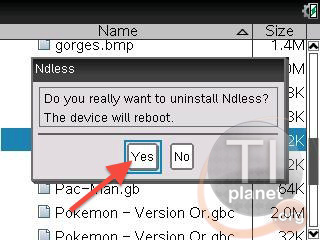
How do I install Ndless 3.1 on my Nspire ?
That's easy. Just follow this tutorial :
You want to uninstall Ndless from your calculator ?
That's easy. Just follow this tutorial :
- Downloading Ndless 3.1
Download Ndl3ss here and extract the .zip to a folder of your choice.
- Launching the Nspire Computer Software
If you don't have it already, you can download a trial version here: Windows Mac
- Select the Document explorer
Click on the rightmost tab, as shown in the screenshot.
- Update to OS 3.1
If your software asks/asked you to update to OS 3.1 (3.1.0.392, not higher !), and you did it already, you're good to go. If you didnt update to 3.1 yet, you can either do it manually (see screenshot), or go to the About/Help Menu and click on Check for device OS updates.
- Creating the Ndless folder and Transferring the resources
At the root of your Nspire device files, create a new folder called "ndless". (if you already had one from Ndless 2, ignore this, but delete the ndless-installer.tns and ndless_resources.tns inside). Then, transfer into that new folder the freshly downloaded ndless_resources.tns file from the "calcbin" directory of the ndless folder on your computer, as shown in the screenshot. Do not delete ndless/ndless_resources.tns as long as Ndless is installed, as it can cause a reboot-loop that can only be stopped with a complete reformat & OS reinstallation.
If the drag-and-drop doesn't work, just do it from the software's own explorer frame (just above)
- Transferring the Ndless Installer...
Now, just do the same with the file called ndless_installer-3.1.0.xxx The file extension can be ".tcc" (Nspire CX CAS), ".tco" (Nspire CX), ".tnc" (Nspire CAS), or ".tno" (Nspire). Make sure to choose the right one for your calculator ! In the screenshot, it's for a Nspire CX CAS.
If the drag-and-drop doesn't work, just do it from the software's own explorer frame (just above)
- Ignoring the warning...
The software will warn you that some unsaved stuff can be lost etc. Just ignore this warning popup and press YES, since it's not a real OS we're going to transfer but a "fake one" (Ndless exploit).
- Congratulations !
On your device, you should see just after a few seconds a popup saying Ndless has been successfully installed. Press OK and unplug your device. Yes, I really said unplug your device. Remember, this is not a dangerous process contrary to what the computer software might say, since it's not a real OS. After unplugging your calculator from the computer, just close the computer software's error popup (yes, this is perfectly normal, don't worry). You can now plug your device back to the computer.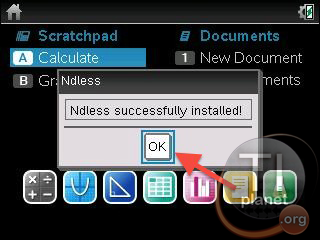
Enjoy ! That's all !
Transfer games, utilities etc.. With Ndless, unleash the power of your Nspire !
You want to uninstall Ndless from your calculator ?
- First step
On your calculator, go to the ndless folder.
- 2nd and last step
Now, just launch the ndless_resources.tns file, and select "Yes". That's all.